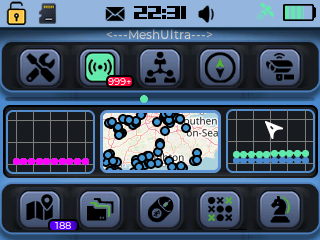
MeshUltra is a purpose-built UI designed for off-grid devices. Moving beyond traditional terminal-style interfaces and limited mobile UIs, MeshUltra delivers a modern, intuitive experience that truly stands out.
The latest on MeshUltra
Fluidity
The MeshUltra firmware has been carefully engineered to get the very best out of the ESP32-S3—balancing performance, usability, and stability. Whether you need a lightweight setup for essential functionality or a fully enhanced interface, MeshUltra scales effortlessly to meet your needs while remaining power-efficient and processor-friendly.
HARDWARE
You will need either a T-Deck or T-Deck+ and a micro SD card.
Proven working SD cards:
SanDisk 128GB SDXC U3 A2.
Kingston SDXC U3 A2.
SanDisk SDHC U3 V30.
If you use another SD card, there are no guarantees it will function correctly.
Note: In order to comply with Patreon’s terms of service and avoid conflicts with their billing system, patreon users are unable to purchase from this store.
Get the ULTIMATE firmware
Step 1
Sign in using a Google account.
NB: Existing Patrons also have access to the site, but are prohibited from making purchases through this website.
Step 2
Purchase a one-time download & licence (per device). If you have multiple devices, you can increase your quantity.
Step 3
Use our web flasher to upload to your compatible device (more devices coming soon)
Step 4
Head to the licence portal, follow the instructions and Enjoy!
LATEST
Project Updates
Version 2.X.X has been released, so we are now in line with Meshcore's 1.15.0 core code. This release focuses on bringing the 1.15.0 core benefits into the custom T-Deck branch while extending the local UI and companion integration.
BLE device capability reporting was updated so the companion app now exposes newer options such as multi-hash/path-hash settings. The T-Deck firmware now supports the newer companion protocol fields and settings, including path hash mode, default flood scope, auto-add behavior, channel-data support, repeat-frequency reporting, and fuller packet stats.
The settings UI was reorganized. The old Meshcore/Meshtastic selector panel was removed, Feedback was renamed to Alerts, and a new top-level M1 tab was added alongside Display, Alerts, Profile, and Mesh. That area now includes local controls for auto-add flags, auto-add hops, path hash bytes, flood scope name/key, BLE PIN, manual add flags, telemetry modes, advert location policy, multi-ACKs, plus read-only repeat-frequency and packet-stats displays.
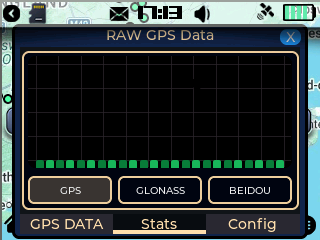
GPS configuration was expanded substantially under Settings > Profile > GPS Settings. Standard baud-rate selection was added, along with configurable GPS RX/TX pins, a Reprobe GPS action, and live diagnostics showing the selected baud, pins, UART state, fix state, and last NMEA sentence. Changing baud or reprobeing now reapplies the live GPS runtime, including pin changes allowing the uses of NEO-6M style devices.
TIPS N TRICKS
ADVICE
Please select the internal storage option for message storage if you want stability. This was implemented as of v367, Settings > Mesh > Storage
REPEATER MANAGEMENT
NEW: Repeater manager app now available. Full settings for repeater management now present.
POWER TRACKING
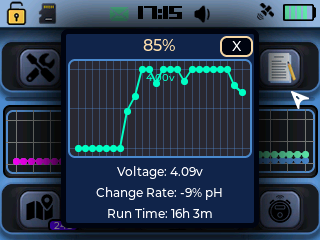
Power Tracking: Check your battery stats on any screen, simply click on the battery icon. Batt Icon > Track your stats with the graph/SOC/runtime. Achieved so far 14h.
TRICK
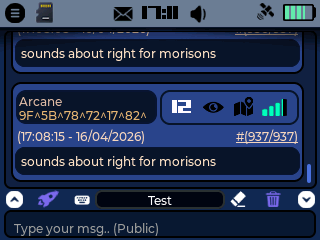
Messaging: When in advance mode, click on a senders name, this will open up a Do Things panel (@user, copy msg, add contact).
HINT
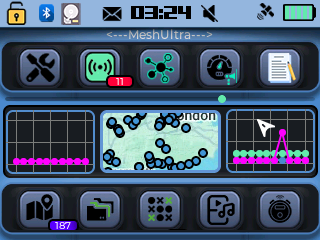
The purple line graph spans across both graphs. It shows you the network activity (adverts, messages, other telemetry).
RECENT FIX
You can now add channels via the companion app, and they are mirrored on your T-Deck.
BUG-ISH
Still looking at speed improvements. Keep the crash reports coming in.
MAPS
Map files should be stored on the root of your SD card e.g. in a folder called 'maps'. In the folder 'maps' this is where you should put the 0-XX folders. So: maps/0, maps/1, maps/2, maps/3........ maps/9 and so on. You can change the directory in (Settings > Profile > Map Settin
Fix - Bluetooth connection fix for Android and iOS
V2.0.2-v30-update.bin2026-05-21
EarlyAccess
Fix - Bluetooth connection fix for Android and iOS
V2.0.2-v30-update.bin2026-05-21
Base
Fix - Bluetooth connection fix for Android and iOS
V2.0.2-v30-firmware-merged.bin2026-05-21
Base
Fix - Bluetooth connection fix for Android and iOS
V2.0.1-v87-launcher-firmware-merged.bin2026-05-16
EarlyAccess
Screen retention fix - auto dim after 20s
V2.0.1-v87-firmware-merged.bin2026-05-16
EarlyAccess
Screen retention fix - auto dim after 20s
V2.0.1-v87-update.bin2026-05-16
Base
Screen retention fix - auto dim after 20s
V2.0.1-v87-launcher-firmware-merged.bin2026-05-16
Base
Screen retention fix - auto dim after 20s
V2.0.1-v87-firmware-merged.bin2026-05-16
Base
Screen retention fix - auto dim after 20s
V2.0.1-v84-launcher-firmware-merged.bin2026-05-14
EarlyAccess
- Set upper and lower values for your battery. Settings > Profile > Battery
Launcher + Firmware -----------------------------------
This firmware includes a launcher that allows you to boot other mesh firmwares such as Meshtastic, MeshCore, Ripple, and MeshOS. It also includes the latest MeshUltra UI firmware by default.
Other firmware .bin files can be stored anywhere on the SD card — the launcher will automatically search for and detect them.
IMPORTANT:
After flashing for the first time, you must move the scroll wheel within 5 seconds and select VXX to complete the installation.
On all future boots, if no selection is made within 5 seconds, the launcher will automatically boot into the last firmware
V2.0.1-v84-launcher-firmware-merged.bin2026-05-14
Base
- Set upper and lower values for your battery. Settings > Profile > Battery
Launcher + Firmware -----------------------------------
This firmware includes a launcher that allows you to boot other mesh firmwares such as Meshtastic, MeshCore, Ripple, and MeshOS. It also includes the latest MeshUltra UI firmware by default.
Other firmware .bin files can be stored anywhere on the SD card — the launcher will automatically search for and detect them.
IMPORTANT:
After flashing for the first time, you must move the scroll wheel within 5 seconds and select VXX to complete the installation.
On all future boots, if no selection is made within 5 seconds, the launcher will automatically boot into the last firmware
V2.0.1-v84-update.bin2026-05-14
Base
- Set upper and lower values for your battery. Settings > Profile > Battery
V2.0.1-v84-firmware-merged.bin2026-05-14
Base
- Set upper and lower values for your battery. Settings > Profile > Battery
V2.0.1-v84-update.bin2026-05-14
EarlyAccess
- Set upper and lower values for your battery. Settings > Profile > Battery
V2.0.1-v84-firmware-merged.bin2026-05-14
EarlyAccess
- Set upper and lower values for your battery. Settings > Profile > Battery
V2.0.1-v83-launcher-firmware-merged.bin2026-05-14
EarlyAccess
- More power saving
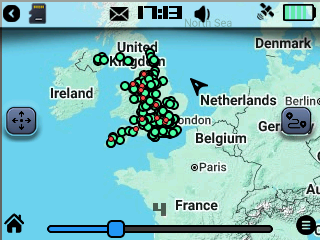
- Bluetooth stability and new message map tracing in messages when in advanced mode. - You can click on the HOP number and Map Icon to view a rough'ish trace (Red dot - where the FW thinks the message originated from). This is heavily SD dependant, so you will need a good fast SD for things to run smoothly) if not, turn tracing off!).
NB: trace mapping is extremely experimental and can be turned off in Settings > Mesh > Trace (ON by default).
Launcher + Firmware -----------------------------------
This firmware includes a launcher that allows you to boot other mesh firmwares such as Meshtastic, MeshCore, Ripple, and MeshOS. It also includes the latest MeshUltra UI firmware by default.
Other firmware .bin files can be stored anywhere on the SD card — the launcher will automatically search for and detect them.
IMPORTANT:
After flashing for the first time, you must move the scroll wheel within 5 seconds and select VXX to complete the installation.
On all future boots, if no selection is made within 5 seconds, the launcher will automatically boot into the last firmware that was running on your T-Deck.
V2.0.1-v83-update.bin2026-05-14
EarlyAccess
- More power saving
- Bluetooth stability and new message map tracing in messages when in advanced mode. - You can click on the HOP number and Map Icon to view a rough'ish trace (Red dot - where the FW thinks the message originated from). This is heavily SD dependant, so you will need a good fast SD for things to run smoothly) if not, turn tracing off!).
NB: trace mapping is extremely experimental and can be turned off in Settings > Mesh > Trace (ON by default).
V2.0.1-v83-firmware-merged.bin2026-05-14
EarlyAccess
- More power saving
- Bluetooth stability and new message map tracing in messages when in advanced mode. - You can click on the HOP number and Map Icon to view a rough'ish trace (Red dot - where the FW thinks the message originated from). This is heavily SD dependant, so you will need a good fast SD for things to run smoothly) if not, turn tracing off!).
NB: trace mapping is extremely experimental and can be turned off in Settings > Mesh > Trace (ON by default).
V2.0.1-v83-launcher-firmware-merged.bin2026-05-14
Base
- More power saving
- Bluetooth stability and new message map tracing in messages when in advanced mode. - You can click on the HOP number and Map Icon to view a rough'ish trace (Red dot - where the FW thinks the message originated from). This is heavily SD dependant, so you will need a good fast SD for things to run smoothly) if not, turn tracing off!).
NB: trace mapping is extremely experimental and can be turned off in Settings > Mesh > Trace (ON by default).
Launcher + Firmware -----------------------------------
This firmware includes a launcher that allows you to boot other mesh firmwares such as Meshtastic, MeshCore, Ripple, and MeshOS. It also includes the latest MeshUltra UI firmware by default.
Other firmware .bin files can be stored anywhere on the SD card — the launcher will automatically search for and detect them.
IMPORTANT:
After flashing for the first time, you must move the scroll wheel within 5 seconds and select VXX to complete the installation.
On all future boots, if no selection is made within 5 seconds, the launcher will automatically boot into the last firmware that was running on your T-Deck.
V2.0.1-v83-update.bin2026-05-14
Base
- More power saving
- Bluetooth stability and new message map tracing in messages when in advanced mode. - You can click on the HOP number and Map Icon to view a rough'ish trace (Red dot - where the FW thinks the message originated from). This is heavily SD dependant, so you will need a good fast SD for things to run smoothly) if not, turn tracing off!).
NB: trace mapping is extremely experimental and can be turned off in Settings > Mesh > Trace (ON by default).
V2.0.1-v83-firmware-merged.bin2026-05-14
Base
- More power saving
- Bluetooth stability and new message map tracing in messages when in advanced mode. - You can click on the HOP number and Map Icon to view a rough'ish trace (Red dot - where the FW thinks the message originated from). This is heavily SD dependant, so you will need a good fast SD for things to run smoothly) if not, turn tracing off!).
NB: trace mapping is extremely experimental and can be turned off in Settings > Mesh > Trace (ON by default).
V2.0.1-v76-update.bin2026-05-13
EarlyAccess
Under test for Bluetooth stability and new message map tracing in messages when in advanced mode. You can click on the HOP number and Map Icon to view a rough'ish trace (Red dot - where the FW thinks the message originated from) This is heavily SD dependant, so you will need a good fast SD for things to run smoothly) if not, turn tracing off!).
NB: trace mapping is extremely experimental and can be turned off in Settings > Mesh > Trace (ON by default).
V2.0.1-v76-launcher-firmware-merged.bin2026-05-13
EarlyAccess
Under test for Bluetooth stability and new message map tracing in messages when in advanced mode. You can click on the HOP number and Map Icon to view a rough'ish trace (Red dot - where the FW thinks the message originated from) This is heavily SD dependant, so you will need a good fast SD for things to run smoothly) if not, turn tracing off!).
NB: trace mapping is extremely experimental and can be turned off in Settings > Mesh > Trace (ON by default).
Launcher + Firmware -----------------------------------
This firmware includes a launcher that allows you to boot other mesh firmwares such as Meshtastic, MeshCore, Ripple, and MeshOS. It also includes the latest MeshUltra UI firmware by default.
Other firmware .bin files can be stored anywhere on the SD card — the launcher will automatically search for and detect them.
IMPORTANT:
After flashing for the first time, you must move the scroll wheel within 5 seconds and select VXX to complete the installation.
On all future boots, if no selection is made within 5 seconds, the launcher will automatically boot into the last firmware that was running on your T-Deck.
V2.0.1-v76-firmware-merged.bin2026-05-13
EarlyAccess
Under test for Bluetooth stability and new message map tracing in messages when in advanced mode. You can click on the HOP number and Map Icon to view a rough'ish trace (Red dot - where the FW thinks the message originated from) This is heavily SD dependant, so you will need a good fast SD for things to run smoothly) if not, turn tracing off!).
NB: trace mapping is extremely experimental and can be turned off in Settings > Mesh > Trace (ON by default).
V2.0.1-v76-firmware-merged.bin2026-05-13
Base
Under test for Bluetooth stability and new message map tracing in messages when in advanced mode. You can click on the HOP number and Map Icon to view a rough'ish trace (Red dot - where the FW thinks the message originated from) This is heavily SD dependant, so you will need a good fast SD for things to run smoothly) if not, turn tracing off!).
NB: trace mapping is extremely experimental and can be turned off in Settings > Mesh > Trace (ON by default).
V2.0.1-v76-launcher-firmware-merged.bin2026-05-13
Base
Under test for Bluetooth stability and new message map tracing in messages when in advanced mode. You can click on the HOP number and Map Icon to view a rough'ish trace (Red dot - where the FW thinks the message originated from) This is heavily SD dependant, so you will need a good fast SD for things to run smoothly) if not, turn tracing off!).
NB: trace mapping is extremely experimental and can be turned off in Settings > Mesh > Trace (ON by default).
Launcher + Firmware -----------------------------------
This firmware includes a launcher that allows you to boot other mesh firmwares such as Meshtastic, MeshCore, Ripple, and MeshOS. It also includes the latest MeshUltra UI firmware by default.
Other firmware .bin files can be stored anywhere on the SD card — the launcher will automatically search for and detect them.
IMPORTANT:
After flashing for the first time, you must move the scroll wheel within 5 seconds and select VXX to complete the installation.
On all future boots, if no selection is made within 5 seconds, the launcher will automatically boot into the last firmware that was running on your T-Deck.
V2.0.1-v76-update.bin2026-05-13
Base
Under test for Bluetooth stability and new message map tracing in messages when in advanced mode. You can click on the HOP number and Map Icon to view a rough'ish trace (Red dot - where the FW thinks the message originated from) This is heavily SD dependant, so you will need a good fast SD for things to run smoothly) if not, turn tracing off!).
NB: trace mapping is extremely experimental and can be turned off in Settings > Mesh > Trace (ON by default).
V2.0.1-v75-firmware-merged.bin2026-05-13
Base
Under test for Bluetooth stability and new message map tracing in messages when in advanced mode. You can click on the HOP number and Map Icon to view a rough'ish trace (Red dot - where the FW thinks the message originated from) This is heavily SD dependant, so you will need a good fast SD for things to run smoothly) if not, turn tracing off!).
NB: trace mapping is extremely experimental and can be turned off in Settings > Mesh > Trace (ON by default).
V2.0.1-v75-launcher-firmware-merged.bin2026-05-13
Base
Under test for Bluetooth stability and new message map tracing in messages when in advanced mode. You can click on the HOP number and Map Icon to view a rough'ish trace (Red dot - where the FW thinks the message originated from) This is heavily SD dependant, so you will need a good fast SD for things to run smoothly) if not, turn tracing off!).
NB: trace mapping is extremely experimental and can be turned off in Settings > Mesh > Trace (ON by default).
Launcher + Firmware -----------------------------------
This firmware includes a launcher that allows you to boot other mesh firmwares such as Meshtastic, MeshCore, Ripple, and MeshOS. It also includes the latest MeshUltra UI firmware by default.
Other firmware .bin files can be stored anywhere on the SD card — the launcher will automatically search for and detect them.
IMPORTANT:
After flashing for the first time, you must move the scroll wheel within 5 seconds and select VXX to complete the installation.
On all future boots, if no selection is made within 5 seconds, the launcher will automatically boot into the last firmware that was running on your T-Deck.
V2.0.1-v75-update.bin2026-05-13
Base
Under test for Bluetooth stability and new message map tracing in messages when in advanced mode. You can click on the HOP number and Map Icon to view a rough'ish trace (Red dot - where the FW thinks the message originated from) This is heavily SD dependant, so you will need a good fast SD for things to run smoothly) if not, turn tracing off!).
NB: trace mapping is extremely experimental and can be turned off in Settings > Mesh > Trace (ON by default).
V2.0.1-v75-firmware-merged.bin2026-05-13
EarlyAccess
Under test for Bluetooth stability and new message map tracing in messages when in advanced mode. You can click on the HOP number and Map Icon to view a rough'ish trace (Red dot - where the FW thinks the message originated from) This is heavily SD dependant, so you will need a good fast SD for things to run smoothly) if not, turn tracing off!).
NB: trace mapping is extremely experimental and can be turned off in Settings > Mesh > Trace (ON by default).
V2.0.1-v75-launcher-firmware-merged.bin2026-05-13
EarlyAccess
Under test for Bluetooth stability and new message map tracing in messages when in advanced mode. You can click on the HOP number and Map Icon to view a rough'ish trace (Red dot - where the FW thinks the message originated from) This is heavily SD dependant, so you will need a good fast SD for things to run smoothly) if not, turn tracing off!).
NB: trace mapping is extremely experimental and can be turned off in Settings > Mesh > Trace (ON by default).
Launcher + Firmware -----------------------------------
This firmware includes a launcher that allows you to boot other mesh firmwares such as Meshtastic, MeshCore, Ripple, and MeshOS. It also includes the latest MeshUltra UI firmware by default.
Other firmware .bin files can be stored anywhere on the SD card — the launcher will automatically search for and detect them.
IMPORTANT:
After flashing for the first time, you must move the scroll wheel within 5 seconds and select VXX to complete the installation.
On all future boots, if no selection is made within 5 seconds, the launcher will automatically boot into the last firmware that was running on your T-Deck.
V2.0.1-v75-update.bin2026-05-13
EarlyAccess
Under test for Bluetooth stability and new message map tracing in messages when in advanced mode. You can click on the HOP number and Map Icon to view a rough'ish trace (Red dot - where the FW thinks the message originated from) This is heavily SD dependant, so you will need a good fast SD for things to run smoothly) if not, turn tracing off!).
NB: trace mapping is extremely experimental and can be turned off in Settings > Mesh > Trace (ON by default).
V2.0.1-v3-launcher-firmware-merged.bin2026-05-11
EarlyAccess
New Stable: This firmware includes a launcher that allows you to boot other mesh firmwares such as Meshtastic, MeshCore, Ripple, and MeshOS. It also includes the latest MeshUltra UI firmware by default.
Other firmware .bin files can be stored anywhere on the SD card — the launcher will automatically search for and detect them.
IMPORTANT:
After flashing for the first time, you must move the scroll wheel within 5 seconds and select VXX to complete the installation.
On all future boots, if no selection is made within 5 seconds, the launcher will automatically boot into the last firmware that was running on your T-Deck.
V2.0.1-v3-launcher-firmware-merged.bin2026-05-11
Base
New Stable: This firmware includes a launcher that allows you to boot other mesh firmwares such as Meshtastic, MeshCore, Ripple, and MeshOS. It also includes the latest MeshUltra UI firmware by default.
Other firmware .bin files can be stored anywhere on the SD card — the launcher will automatically search for and detect them.
IMPORTANT:
After flashing for the first time, you must move the scroll wheel within 5 seconds and select VXX to complete the installation.
On all future boots, if no selection is made within 5 seconds, the launcher will automatically boot into the last firmware that was running on your T-Deck.
V2.0.0-v93-launcher-firmware-merged.bin2026-05-10
Base
DO NOT USE (ECO TEST)
V2.0.0-v67-launcher-firmware-merged.bin2026-05-10
EarlyAccess
!UNDER TEST! Use V2.0.0-v19 for stability. this update has a built in launcher, allowing you to use other .bin files alongside MeshUltra such as Meshtastic, Meshcore Ripple, MeshOS etc. This is the 1st iteration and has not undergone rigorous testing. More updates coming soon.
V2.0.0-v67-launcher-firmware-merged.bin2026-05-10
Base
!UNDER TEST! Use V2.0.0-v19 for stability. this update has a built in launcher, allowing you to use other .bin files alongside MeshUltra such as Meshtastic, Meshcore Ripple, MeshOS etc. This is the 1st iteration and has not undergone rigorous testing. More updates coming soon.!UNDER TEST! Use V2.0.0-v19 for stability. this update has a built in launcher, allowing you to use other .bin files alongside MeshUltra such as Meshtastic, Meshcore Ripple, MeshOS etc. This is the 1st iteration and has not undergone rigorous testing. More updates coming soon.
V2.0.0-v63-launcher-firmware-merged.bin2026-05-10
Base
TEST DO NOT USE. Use v19
V2.0.0-v63-launcher-firmware-merged.bin2026-05-10
EarlyAccess
TEST DO NOT USE. Use v19
V2.0.0-v50-launcher-firmware-merged.bin2026-05-10
Base
TEST DO NOT USE. Only use V19
V2.0.0-v49-launcher-firmware-merged.bin2026-05-10
Base
TEST DO NOT USE. Only use V19
V2.0.0-v48-launcher-firmware-merged.bin2026-05-10
Base
TEST DO NOT USE
V2.0.0-v47-launcher-firmware-merged.bin2026-05-10
Base
TEST DO NOT USE
V2.0.0-v19-update.bin2026-05-09
EarlyAccess
General bug fixes
V2.0.0-v19-firmware-merged.bin2026-05-09
EarlyAccess
General bug fixes
V2.0.0-v19-update.bin2026-05-09
Base
General bug fixes
V2.0.0-v19-firmware-merged.bin2026-05-09
Base
General bug fixes
V2.0.0-v16-update.bin2026-05-08
EarlyAccess
Custom GPS, set pins and probe GPS fix. (settings > profile > GPS settings).
V2.0.0-v16-firmware-merged.bin2026-05-08
EarlyAccess
Custom GPS, set pins and probe GPS fix. (settings > profile > GPS settings).
V2.0.0-v16-update.bin2026-05-08
Base
Custom GPS, set pins and probe GPS fix. (settings > profile > GPS settings).
V2.0.0-v16-firmware-merged.bin2026-05-08
Base
Custom GPS, set pins and probe GPS fix. (settings > profile > GPS settings).
V2.0.0-v10-update.bin2026-05-07
EarlyAccess
Settings > M1 keyboard fix. V2.0 still largely untested.
V2.0.0-v10-firmware-merged.bin2026-05-07
EarlyAccess
Settings > M1 keyboard fix. V2.0 still largely untested.
V2.0.0-v10-update.bin2026-05-07
Base
Settings > M1 keyboard fix. V2.0 still largely untested.
V2.0.0-v10-firmware-merged.bin2026-05-07
Base
Settings > M1 keyboard fix. V2.0 still largely untested.
V2.0.0-v8-firmware-merged.bin2026-05-07
EarlyAccess
Major release: Aligned to core 1.15.0. Addition of multi byte pathing and custom GPS (set baud/probe).
V2.0.0-v8-update.bin2026-05-07
EarlyAccess
Major release: Aligned to core 1.15.0. Addition of multi byte pathing and custom GPS (set baud/probe).
V2.0.0-v8-update.bin2026-05-07
Base
Major release: Aligned to core 1.15.0. Addition of multi byte pathing and custom GPS (set baud/probe).
V2.0.0-v8-firmware-merged.bin2026-05-07
Base
Major release: Aligned to core 1.15.0. Addition of multi byte pathing and custom GPS (set baud/probe).
V1.1.6-v50-update.bin2026-05-06
Base
Check for licence at boot.
V1.1.6-v50-firmware-merged.bin2026-05-06
Base
Check for licence at boot.
V1.1.6-v50-firmware-merged.bin2026-05-06
EarlyAccess
Check for licence at boot.
V1.1.6-v50-update.bin2026-05-06
EarlyAccess
Check for licence at boot.
V1.1.6-v43-update.bin2026-05-06
Base
MyDeviceID Fix
V1.1.6-v43-firmware-merged.bin2026-05-06
Base
MyDeviceID Fix
V1.1.6-v43-firmware-merged.bin2026-05-06
EarlyAccess
MyDeviceID Fix
V1.1.6-v43-update.bin2026-05-06
EarlyAccess
MyDeviceID Fix
V1.1.6-v42-update.bin2026-05-06
Base
Mydevice Id fix
V1.1.6-v42-firmware-merged.bin2026-05-06
Base
Mydevice ID fix
V1.1.6-v42-update.bin2026-05-06
EarlyAccess
My Device Id fix
V1.1.6-v42-firmware-merged.bin2026-05-06
EarlyAccess
My Device ID fix
V1.1.6-v37-update.bin2026-05-06
Base
Implementation - Allow device booting without an SD card.
V1.1.6-v37-firmware-merged.bin2026-05-06
Base
Implementation - Allow device booting without an SD card.
V1.1.6-v37-update.bin2026-05-06
EarlyAccess
Implementation - Allow device booting without an SD card.
V1.1.6-v37-firmware-merged.bin2026-05-06
EarlyAccess
Implementation - Allow device booting without an SD card.
V1.1.6-v34-firmware-merged.bin2026-05-06
Base
Added SD boot logs
V1.1.6-v34-firmware-merged.bin2026-05-06
EarlyAccess
Added SD boot logs
V1.1.6-v34-update.bin2026-05-06
EarlyAccess
Added SD boot logs
V1.1.6-v34-update.bin2026-05-06
Base
Added SD boot logs
V1.1.6-v31-update.bin2026-05-05
Base
General bug fixes
V1.1.6-v31-update.bin2026-05-05
EarlyAccess
General bug fixes
V1.1.6-v29-update.bin2026-05-04
Base
Implementation - Contact options: Click on a contact name when in the recent tab of messages, this provides (Total message count, Delete chat, mute channel). Move chat to SD/iSD(internal storage) not implemented yet.
V1.1.6-v29-update.bin2026-05-04
EarlyAccess
Implementation - Contact options: Click on a contact name when in the recent tab of messages, this provides (Total message count, Delete chat, mute channel). Move chat to SD/iSD(internal storage) not implemented yet.
V1.1.6-v10-update.bin2026-05-04
Base
Major - Speed boost UI improvement (V1.1.6.XX)
Implementation - Step frequency of the Channel activity graphs (purple) on the home screen is configurable from Settings > Display > Channel Activity.
V1.1.6-v10-update.bin2026-05-04
EarlyAccess
Major - Speed boost UI improvement (V1.1.6.XX)
Implementation - Step frequency of the Channel activity graphs (purple) on the home screen is configurable from Settings > Display > Channel Activity.
V1.1.5-v100-update.bin2026-05-04
EarlyAccess
Fix - Advert manager bug fix
V1.1.5-v100-update.bin2026-05-04
Base
Fix - Advert manager bug fix
V1.1.5-v96-update.bin2026-05-03
Base
fix - back button reset error on messages screen
V1.1.5-v96-update.bin2026-05-03
EarlyAccess
fix - back button reset error on messages screen
V1.1.5-v43-update.bin2026-05-01
Base
Updates:
- New core code (please regen your licence)
- Start a DM from the favourite contacts.
- Start a DM from contacts.
- Maps: Green flashing pin showing your location according to GPS or hard set position.
- General bug fixes.
V1.1.5-v43-update.bin2026-05-01
EarlyAccess
Updates:
- New core code (please regen your licence)
- Start a DM from the favourite contacts.
- Start a DM from contacts.
- Maps: Green flashing pin showing your location according to GPS or hard set position.
- General bug fixes.
V1.1.5-v51-update.bin2026-05-01
EarlyAccess
Updates:
- New core code (please regen your licence)
- Start a DM from the favorite contacts.
- Start a DM from contacts.
- Maps: Green flashing pin showing your location according to GPS or hard set position.
- General bug fixes.
V1.1.5-v51-update.bin2026-05-01
Base
Updates:
- New core code (please regen your licence)
- Start a DM from the favorite contacts.
- Start a DM from contacts.
- Maps: Green flashing pin showing your location according to GPS or hard set position.
- General bug fixes.
V1.1.5-v40-update.bin2026-05-01
EarlyAccess
Updates:
- New core code (please regen your licence)
- Start a DM from the favorite contacts.
- Start a DM from contacts.
- Maps: Green flashing pin showing your location according to GPS or hard set position.
- General bug fixes.
V1.1.5-v40-firmware-merged.bin2026-05-01
Base
Updates:
- New core code (please regen your licence)
- Start a DM from the favorite contacts.
- Start a DM from contacts.
- Maps: Green flashing pin showing your location according to GPS or hard set position.
- General bug fixes.
V1.1.0-v523-update.bin2026-04-28
EarlyAccess
Fix - memory leak
V1.1.0-v523-update.bin2026-04-28
Base
Fix - memory leak
V1.1.0-v521-update.bin2026-04-28
EarlyAccess
Fix - app badges not updating after timeout.
Improvement - Power Management.
V1.1.0-v521-update.bin2026-04-28
Base
Fix - app badges not updating after timeout.
Improvement - Power Management.
V1.1.0-v500-update.bin2026-04-25
EarlyAccess
Fix - Repeater manager input
V1.1.0-v500-update.bin2026-04-25
Base
Fix - Repeater manager input
V1.1.0-v490-update.bin2026-04-23
Base
Bug fix - Messages
Implementation - Power saver
V1.1.0-v490-update.bin2026-04-23
EarlyAccess
Bug fix - Messages
Implementation - Power saver
V1.1.0-v469-firmware-merged.bin2026-04-20
Base
Full screen repeater manager
V1.1.0-v469-firmware-merged.bin2026-04-20
EarlyAccess
Full screen repeater manager
V1.1.0-v467-update.bin2026-04-20
EarlyAccess
Fix - Message screen random crash.
V1.1.0-v467-firmware-merged.bin2026-04-20
EarlyAccess
Fix - Message screen random crash.
V1.1.0-v467-update.bin2026-04-20
Base
Fix - Message screen random crash.
V1.1.0-v467-firmware-merged.bin2026-04-20
Base
Fix - Message screen random crash.
V1.1.0-v460-firmware-merged.bin2026-04-19
Base
Fix - Companion App: When you add a channel in the app, it is replicated on the T-Deck.
Long term testing: None
V1.1.0-v460-update.bin2026-04-19
Base
Fix - Companion App: When you add a channel in the app, it is replicated on the T-Deck.
Long term testing: None
V1.1.0-v460-update.bin2026-04-19
EarlyAccess
Fix - Companion App: When you add a channel in the app, it is replicated on the T-Deck.
Long term testing: None
V1.1.0-v460-firmware-merged.bin2026-04-19
EarlyAccess
Fix - Companion App: When you add a channel in the app, it is replicated on the T-Deck.
Long term testing: None
V1.1.0-v448-update.bin2026-04-19
EarlyAccess
Home > Repeater Manager: Full repeater management options.
V1.1.0-v448-firmware-merged.bin2026-04-19
EarlyAccess
Home > Repeater Manager: Full repeater management options.
V1.1.0-v448-update.bin2026-04-19
Base
Home > Repeater Manager: Full repeater management options.
V1.1.0-v448-firmware-merged.bin2026-04-19
Base
Home > Repeater Manager: Full repeater management options.
V1.1.0-v444-update.bin2026-04-19
EarlyAccess
Crash log updates
V1.1.0-v444-firmware-merged.bin2026-04-19
EarlyAccess
Crash log updates
V1.1.0-v444-firmware-merged.bin2026-04-19
Base
Crash log updates
V1.1.0-v444-update.bin2026-04-19
Base
Crash log updates
V1.1.0-v426-update.bin2026-04-18
EarlyAccess
2 Blank Icons now actioned:
- Repeater manager: Now available from home screen (log in, change name, lat/lon, sync time, advert)
- Advert watcher: Now available on the home screen (shows recent adverts).
Messages Screen
- Stats page now running.
V1.1.0-v426-firmware-merged.bin2026-04-18
EarlyAccess
2 Blank Icons now actioned:
- Repeater manager: Now available from home screen (log in, change name, lat/lon, sync time, advert)
- Advert watcher: Now available on the home screen (shows recent adverts).
Messages Screen
- Stats page now running.
V1.1.0-v426-firmware-merged.bin2026-04-18
Base
2 Blank Icons now actioned:
- Repeater manager: Now available from home screen (log in, change name, lat/lon, sync time, advert)
- Advert watcher: Now available on the home screen (shows recent adverts).
Messages Screen
- Stats page now running.
V1.1.0-v426-update.bin2026-04-18
Base
2 Blank Icons now actioned:
- Repeater manager: Now available from home screen (log in, change name, lat/lon, sync time, advert)
- Advert watcher: Now available on the home screen (shows recent adverts).
Messages Screen
- Stats page now running.
V1.1.0-v397-update.bin2026-04-17
Base
The “Send Location to Mesh” switch in Settings > Profile controls all of this.
If it’s turned off, your location is never shared.
If it’s turned on:
When the device starts – it sends your saved manual location, if you have one set
When you press “Set Home Location” on the map – it immediately shares your current map position
When GPS has a signal and you move – it shares your location at most once every set number of minutes (this is controlled by the Interval setting below the switch, which is 5 minutes by default)
If there’s no GPS signal but you have a manual location saved – it shares that location once when the device starts or when GPS updates are triggered
V1.1.0-v397-firmware-merged.bin2026-04-17
Base
The “Send Location to Mesh” switch in Settings > Profile controls all of this.
If it’s turned off, your location is never shared.
If it’s turned on:
When the device starts – it sends your saved manual location, if you have one set
When you press “Set Home Location” on the map – it immediately shares your current map position
When GPS has a signal and you move – it shares your location at most once every set number of minutes (this is controlled by the Interval setting below the switch, which is 5 minutes by default)
If there’s no GPS signal but you have a manual location saved – it shares that location once when the device starts or when GPS updates are triggered
V1.1.0-v397-firmware-merged.bin2026-04-17
EarlyAccess
The “Send Location to Mesh” switch in Settings > Profile controls all of this.
If it’s turned off, your location is never shared.
If it’s turned on:
When the device starts – it sends your saved manual location, if you have one set
When you press “Set Home Location” on the map – it immediately shares your current map position
When GPS has a signal and you move – it shares your location at most once every set number of minutes (this is controlled by the Interval setting below the switch, which is 5 minutes by default)
If there’s no GPS signal but you have a manual location saved – it shares that location once when the device starts or when GPS updates are triggered
V1.1.0-v397-update.bin2026-04-17
EarlyAccess
The “Send Location to Mesh” switch in Settings > Profile controls all of this.
If it’s turned off, your location is never shared.
If it’s turned on:
When the device starts – it sends your saved manual location, if you have one set
When you press “Set Home Location” on the map – it immediately shares your current map position
When GPS has a signal and you move – it shares your location at most once every set number of minutes (this is controlled by the Interval setting below the switch, which is 5 minutes by default)
If there’s no GPS signal but you have a manual location saved – it shares that location once when the device starts or when GPS updates are triggered
V1.1.0-v383-update.bin2026-04-17
EarlyAccess
GPS enhancement - manual setting of location. Enable/Disable push to mesh.
V1.1.0-v383-firmware-merged.bin2026-04-17
EarlyAccess
GPS enhancement - manual setting of location. Enable/Disable push to mesh.
V1.1.0-v383-update.bin2026-04-17
Base
GPS enhancement - manual setting of location. Enable/Disable push to mesh.
V1.1.0-v383-firmware-merged.bin2026-04-17
Base
GPS enhancement - manual setting of location. Enable/Disable push to mesh.
MESHULTRA FOR MESHCORE (T-DECK & T-DECK+)
Fluid UI
MeshUltra is the first firmware to truly unlock the full potential of the ESP32-S3. It pushes the hardware far beyond what most would consider possible, delivering performance and responsiveness that set a new benchmark.
While still under active development, the firmware is already highly capable and stable. In its current state, it is fully usable and, realistically, around 95% complete. Ongoing improvements will continue to refine and enhance the experience.
MESSAGES
Messages
The messaging system supports persistent storage, either on internal memory or the SD card.
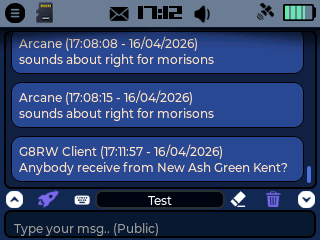
Two interface modes are available: advanced and simple. You can switch between them by double-clicking the trackball.
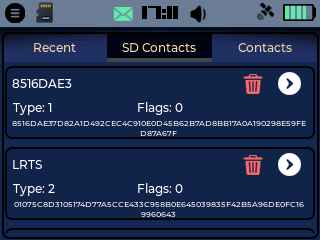
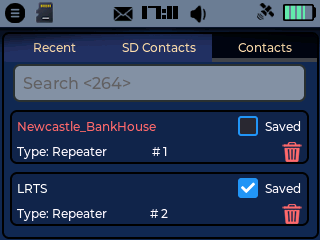
The Recent view displays contacts in order of activity. SD Contacts act as favourites and are automatically loaded on boot to ensure availability. The Contacts view shows all currently available contacts.
Contacts can be marked as saved, which adds them to SD Contacts. A search function is included. Activate the field, begin typing, press enter, and the list will automatically filter.
The menu bar allows quick switching between the contacts list, message window, and quick settings view.
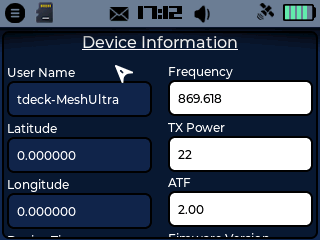
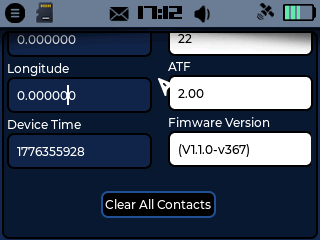
A settings shortcut provides a quick overview of current configuration and includes the option to clear all contacts, excluding those stored on the SD card.
*The on-screen gauge is currently under review and may be removed unless a clear use case is identified.
OTHER APPLICATIONS
Contacts
This is not yet implemented. Contact management is currently handled within the Messages section, and this may be replaced with a repeater management application in the future.
Gallery
Not yet implemented. However, holding the Enter key on any screen will capture a screenshot and save it to the SD card.
Notepad
Allows notes to be stored directly on the SD card. The maximum number of saved notes is still to be defined.
File Explorer
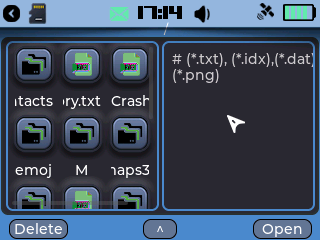
Enables browsing of files stored on the SD card. Files can also be deleted, so caution is advised.
Tic Tac Toe
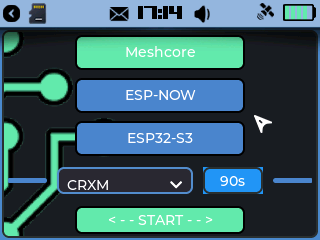
Play Tic Tac Toe over MeshCore between devices or locally against the ESP32. The ESP-NOW option is planned for removal.
MP3
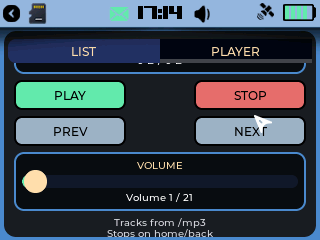
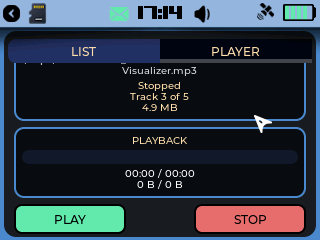
Allows playback of MP3 files stored in a folder named “mp3” on the root of the SD card. This feature is still under testing and stability improvements are ongoing.
Alarm
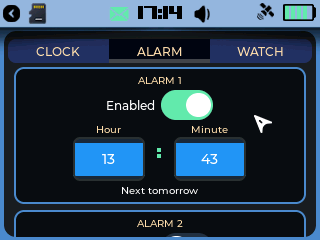
Supports up to five alarms. Additional tone options are planned.
GENERAL
Status Bar
The lock icon can be used to instantly secure the device. The mini map dynamically updates to the location of any repeater advertisement that is detected, which is a particularly powerful feature.
Selecting the battery icon displays detailed battery statistics.
Home Screen
The left graph, shown in purple, represents network activity including adverts, messages, and repeats.
The right graph, shown in green, represents the current noise floor.
Defaults
The default lock screen password is 1234. The default companion passcode is 123456.
MAPS
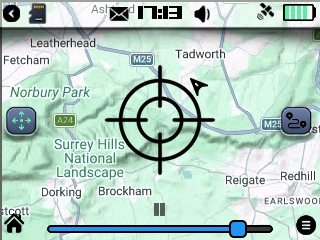
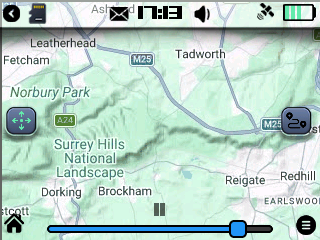
Maps are what truly set MeshUltra apart from what’s currently available. This feature provides access to map data stored on the SD card, with support for custom map tiles and configurable zoom levels. You can zoom in and out using the on-screen slider, view live GPS data, toggle repeaters and contacts, and manage repeater access directly within the interface.
The system also includes a follow mode, allowing it to function as a mini satnav by automatically keeping your current location centered on the screen. To manually explore the map, simply double-click the trackball and move it to pan around.
Map data is based on OpenStreetMap, with a provided global tile set covering zoom levels 0–9. Support for generating and adding your own tiles is included, with a full tutorial coming soon.
Map files should be stored on the root of your SD card e.g. in a folder called 'maps'. In the folder 'maps' this is where you should put the 0-XX folders. So: maps/0, maps/1, maps/2, maps/3........ maps/9 and so on. You can change the directory in (Settings > Profile > Map Settings).
DISPLAY SETTINGS
Display
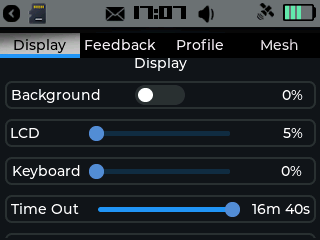
You have full control over the display and lighting behaviour. LCD brightness can be adjusted as needed, and keyboard backlighting is supported on the T-Deck+. On the standard T-Deck, this can be toggled using Alt + B.
BLE Companion support is included and functional, although it is operating close to the limits of the hardware. Screen timeout can be configured anywhere between 5 seconds and 16 minutes 40 seconds. Auto device lock can also be enabled or disabled, with the same timing range available.
TIME SETTINGS
Time
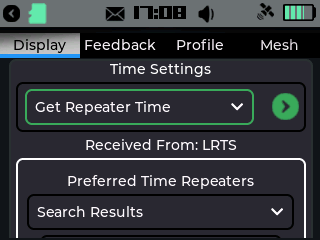
Time can be synchronised in multiple ways. You can configure up to three preferred repeaters for time sync, with the option to manually trigger a sync attempt using the on-screen control.
GPS time is available and works as expected. Time can also be synchronised automatically from a connected companion device such as a phone or tablet.
For users who want persistence after power-off, there is code in place to detect a DS3231 RTC module if installed. This is currently the only way to retain time when the device is powered down.
Time zones must be set correctly for accurate time interpretation. A searchable field allows you to quickly find and select your region. Manual time and date setting is also available, although this is not persistent.
FEEDBACK SETTINGS
Feedback
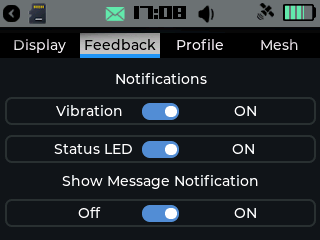
Feedback options allow you to tailor how the device communicates with you. Message notifications can be enabled or disabled, including the floating notification style.
Sound can be set to silent or loud modes. Message tones can be configured independently for direct messages, public messages, and channel messages. Further refinement is planned, including more granular control per channel and visual indicators such as a mute icon in the status bar.
Some features such as vibration, status LED, and gestures are legacy elements carried over from earlier projects and are planned for removal in future updates.
PROFILE SETTINGS
Profile
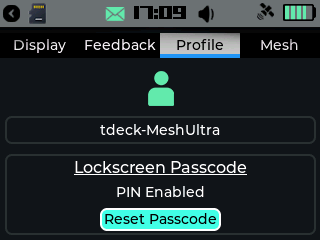
This section manages device identity and configuration. Your MeshCore device name is displayed here, along with your device ID. Lock screen security can be configured with a custom password.
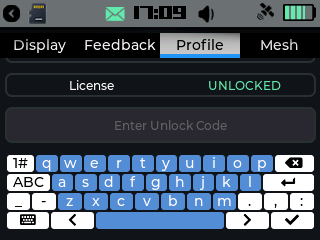
Licensing can be handled manually or by following the instructions provided through the licence portal.
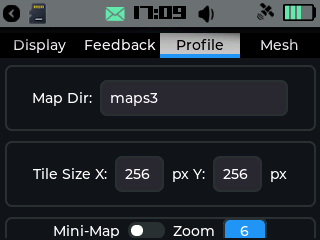
Map configuration allows you to define the directory on the SD card where your map tiles are stored. For example, if your tiles are stored under SD/world/0-9, you would enter “world”. Tile size can also be configured, with 256 by 256 as the standard.
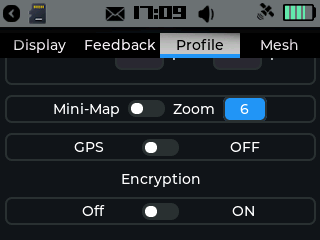
Mini-map functionality is being developed, with options to enable or disable it and adjust zoom levels. GPS can be enabled or disabled, although due to T-Deck hardware limitations, the GPS module cannot be fully powered off.
Encryption support is planned for sending double-encrypted messages over public channels, with future updates allowing custom key configuration.
MESH SETTINGS
Mesh
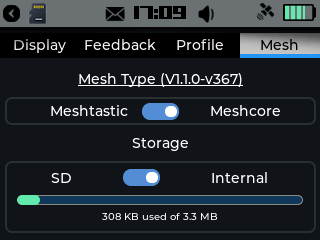
This section provides visibility and control over the mesh system. Your current firmware version is displayed here.
You can choose where messages are stored, either on internal storage or the SD card. Storage usage is shown, with further improvements planned to display both internal and SD statistics more clearly.
Companion mode can be enabled or disabled. Contacts can be automatically saved if required. Public and channel message sounds can be muted, although this setting is planned to be moved to the feedback section.
Message style can be switched between a basic interface with a blue background or a glass-style interface with a more visual, Aero-like appearance. The glass mode has a noticeable performance impact but provides a more polished look.
Emoji support can be enabled or disabled. At present, this feature is slow and has a performance cost. Emoji files should be stored on the SD card in a folder named “emoji”.
Hardware setup allows configuration of up to 10 channels, including channel-based groups. Group creation is straightforward. Enter the channel name, generate the key, and save.
PROJECT ROADMAP
To Do
Fix map screen Menu > Config. Items are cut off. (DONE)
Implement Gallery (to show screen shots)/ Contacts *to be changed to repeater management. (DONE) Full sweep channel activity across the two home screen graphs. (DONE)
Fix SD icon when in internal storage mode. (DONE v370)
Fix mute icon when silent. (DONE v370)
Multibyte pathing (DONE)
Allow 'Start conversation' from both Contacts & SD contacts. (DONE)